
Eduaid Tuition Mobile Web App

Project Type
Independent Project
Mobile App Prototyping
Duration
17 Weeks (Oct -Feb 2024)
My Role
Sole UI/UX Designer
Software Tools
Adobe XD, Illustrator & Photoshop
Overview
Independent project to produce a mobile app that can address a community or social challenge. The chosen challenge topic for this project is Education.
Problem
Information on tuition support schemes for lower-income families is often scattered across various sources, leading to a lack of awareness and making it challenging for families to easily find and apply for academic assistance that are suitable for them.
User Personas & User Journey Maps
I developed three user personas and user journey maps for our target audience, who are lower-income students and their parents as well as organisations that run free tuition programmes.

.png)
.png)
.png)
UX Canvas & Project Goal
I created a UX Canvas to visualise how to the solution will address the users needs, as well as the project goal. Web app was chosen instead of native mobile app to make it easily accessible without having to download an app on their device.
.png)
.png)
User Flow
I created user flows to visualise the flow of the Eduaid app flow when users start using the app, in the perspectives of the two target audiences.

Wireframes
I developed initial wireframes for the Eduaid web app. There were many parts of the app so I broke it up into several parts.
.png)
.png)
.png)
Branding
I created a brand guide which includes the logo, typography and colour scheme of the app branding. Blue was mainly used as it is commonly associated with calmness and concentration, which are related to education.
.png)
Site Map
I crafted a site map to visualise the features and functions of the Eduaid mobile web app. It has two login types, one for parents or students and another for organisations.

User Testing
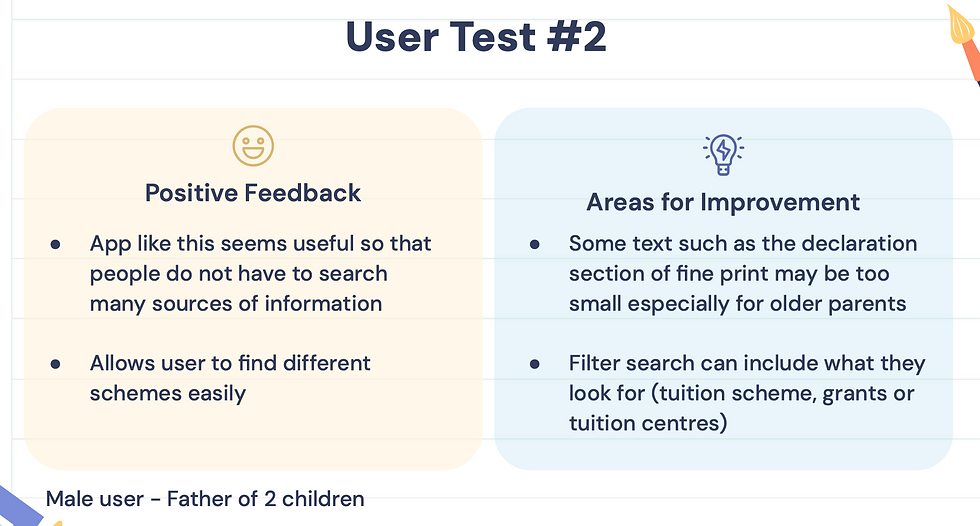
In total, I conducted user testing with 5 users to identify areas for improvement in the app user experience and enhance user experience. Overall, their feedback was positive when they tried the app.



Final Prototype
After another iteration, I completed the final prototype on Adobe XD. It is split into different sections and features of the app. The demo video explains the different features of the Eduaid app.


© 2025 Jolyn Lu
.png)
.png)